
Why Infinihex?
Why Infinihex?
I play a lot of ShadowDark and I run two tables, one online and one in-person. They both share a small, but varied world map. In 2.5 years, my players upturned most of those 168 tiles. They bested two megadungeons (Caverns of Thracia and most of Stonehell!) and, as a major milestone reward, discovered the lands beyond the mountains. Which means...
I need a bigger map. Like, yesterday.
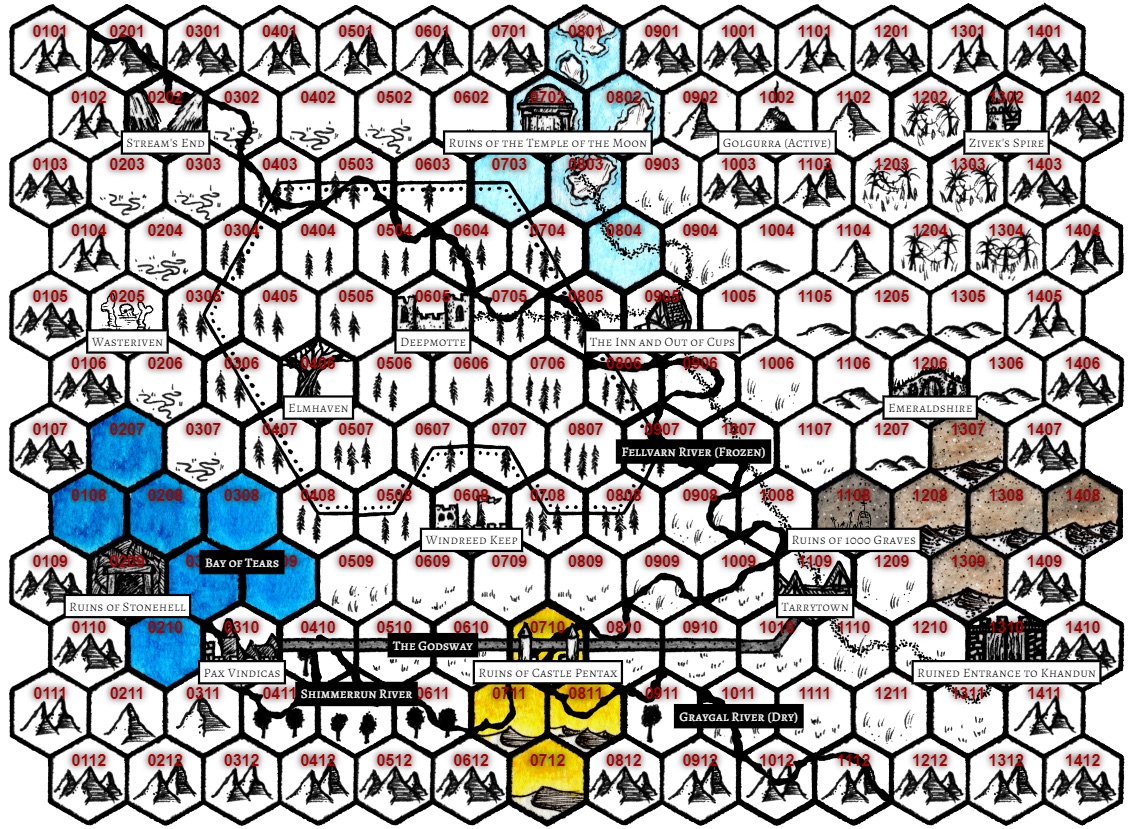
I have all the other hex mapping tools out there. I have a dozen folders filled with gorgeous hex tile artwork. I love them all for what they are. However, I found myself hacking around the complexity or lack-thereof more often than not. I just wanted a big-ass map with coordinates, layers, and some transparency. It should let me use the tiles I already bought. It should be fast. I don't want to download a massive, creaky application to do it. Who wants another Saas login? I just want to import my tiles and start plopping biomes.
Since I've been in the software industry for 20 years making stuff for a bunch of other awesome people, I decided it's time to make something for me (and by proxy, for you, because you deserve a super-easy hex-mapping tool, too).
So, here we are: Infinihex. It does everything I need it to, and nothing I don't. I hope you'll find it useful and I'll speak a little bit to all the design decisions that went into the beta version. By full release, it should feel comparable to a major market hex mapping tool with its own unique take on the art and science of hexmapping.
First, Table Stakes
Here's what I wanted.
Fast. Lightweight. Local.
Simple software done well. Great, consistent UX across the board. Simple branding that gets out of the way and puts map-making at the forefront.
I paid for these hextiles, dangit!
I don't want to make or buy (or rent!) new tile sets. I have dozens. I want to use what I own. I want to be able to add more if I want, when I want.
Superior Layering Functionality.
My world is UX and design, so tools like Affinity, Photoshop, and Figma are second-nature. Layering should feel universally intuitive even if you don't have a ton of design-tool experience.
And, varied brush types: I am not clicking 5000+ times to "fill" every hex on a layer. Come on. We need a paint bucket fill. Also, how about a bigger brush? That's where the hex flower brush comes in. We have single hex, flower brush, and bucket fill options. Eraser modes mirror the brush modes!
Random Generation, But Let's Be Reasonable Here.
Some tools have patently obtuse map gen algorithms. Some have so many dials you could lose your mind searching for all the parameters. I wanted random gen with knobs that show live, obvious results. Oh, and it has to split the map into layers after generation. One single smashed-together output is a non-starter. How do you even edit that?
Indifferent to Setting,
I don't need my tool to tell me I'm building a fantasy map. What if I'm building a space map? What if I'm building a cyberpunk city map? We can't use words like "forest" and "ocean" in the UI chrome or even as hard assumptions. The basic generator does ship as a fantasy map-maker, but you can swap that all out to smash together a star-faring space opera hex crawl in a minute or two.
Really Nice Defaults.
The great folks at Inkwell Ideas released some of their map icon sets to the public domain. They're simple, colorful, and versatile. Check them out if you haven't yet. You'll find an editable hex color-tile libary on top of which you can stack these and away you go.You should be able to map on day 1, no further purchase necessary.
Where I Landed on Labels and GM Tools.
I want to render labels at will. I do not need a full-bore kingdom generator with names, duchys, leaders, religions, factions, etc. baked into my map-making tool. I'm not using my map-making tool as a player-facing GM-aid. Is anybody? Honestly? So many apps have extra "fog of war" and "GM-only" modes. I have come across an astounding ZERO people using map apps as live GM aids in my decade+ in the tabletop community. It's a feature without an audience.
It's going to spit out a PNG and that PNG gets printed, saved, or displayed on a VTT later on.
Labels are not in the beta, but I feel strongly about them being in the full release. No random label gen, though.
Anything Missing?
I can use Infinihex to make the enormous world map I need for my ShadowDark table right now. What feels like it's missing? Here are some features I'm considering, but not right away:
Dynamic Waterways
There are no rivers in the generator. There are no river tiles in the basic tileset. I assume rivers are important, and I may include a free set of river hexes so you can build them out of the box. I don't know how well that plays in the generator, however. I would have to insert some waterway logic that only applies to certain map types, and given my stance on setting agnosticism, it might mean baking in too many land-centric assumptions. TBD, but leaning no on dynamic waterways (but, leaning yes on including free river tiles post-beta).
Generated Points of Interest / Settlements
Technically, you can create a new swatch in the random generator consisting of a settlement or point of interest tile and have it sparsely decorate the map. The one thing it won't do is logically peg it to a coastline or waterway or other "obvious" reallistic terrain placement. I think that's okay. Hand-placing settlements and points of interest is part of what I love about map-making. TBD on if it ends up a full-on feature or not. Leaning no here.
Coastlines
Largely up to you how you want to define coasts. I don't intend to build in a coastline tilekit or include it in the random generator. There are a lot of beautiful tile sets out there that include coastlines, and since the layering system is so streamlined, you should be able to use them pretty easily by hand.
That Humdinger
The late, brilliant Dan Lubin describes the concept like so:
A new [game] mechanism of great and authentic value to the [user].
— Dan Lubin
A gimmick, it ain't. But, what tantalizing twists does Infinihex offer on the hex mapping formula?
Background Imagery
Use it for whatever you wish; onion-skinning a new map over an old map or providing that gritty, washed-out pirate map effect. It's easy to place and size a background image. This is in the beta and will be in full release.
Copy/Duplicate Layers
It seems obvious, if we're going to go after proper design-tool layer capabilities we'd want copy or duplicate as well. This will be in full release.
Find/Replace Tiles
This one is a complete never-before-seen workflow in hex mapping (in my experience, anyway) and I think it's going to transform my map making completely. Aiming for full release, but likely in a subversion later on.
Save/Import Map Generator Settings
More on this later, but the generator is powered by swatches and settings. Swatches are prefab, layered hexes that you assign some distribution metrics in the generator settings. I envision a way to save and import both swatches and settings so you can run back the random seed as many time as you want without having to redo all your hard work every time you want to roll a new map.
For Now, We Build
Infinihex is in closed beta. I'm still building out some of the above and squashing bugs almost daily. What you can do, right now, to get ready for full release is join the email list and keep watch for updates and release notices. I'll even throw in a little launch discount to sweeten the deal. I can't wait to share this with you.
Infinihex isn't live just yet. Drop your email on the home page and I'll tell you the moment it is.